- Published on
Dev update - Pretty Globes & Pointy Sticks
- Authors

- Name
- Nick Foote
April was the month when the "systems" I've been building so far this year finally started talking to each other.
With the core inventory coded, I was able to start on the moment-to-moment combat feel with different weapon types.
The last 30 days were also a deep dive into making sure that swapping equipment, clicking on enemies, and using abilities felt familiar and responsive like a modern ARPG.
The Big Lift: Building the Authoritative Inventory Layer
The massive milestone this month was finally landing the core inventory code. But I didn't want to just stop at a where the tutorial left off. I spent a lot of time extending the base plugin logic to handle more than just weapon sockets.
I’ve now moved into a system that handles full skeletal mesh attachments. This was a huge hurdle to clear—it means that gear isn't just "stuck" to a hand; modular pieces like cloaks or boots now follow the character's body pose perfectly across the network. This establishes a true authoritative inventory layer where the server validates every equipment move before the gameplay systems even see it.
To make the world feel reactive, I also implemented item drop animations. This required a rigorous pipeline where I export assets into Blender to ensure every item has a proper three-state identity: the Equipped mesh for the character, a dedicated Ground mesh for world drops, and the Blueprint inventory object that drives the logic. Seeing an item actually tumble to the ground with physical presence, rather than just appearing in a menu, makes the loot hunt feel real.
The Weapon Identity Framework: Decoupling the AnimBP
This inventory work fed directly into the highest-impact technical win of the month: the Weapon Identity framework.
I’ve built a three-tier Data Asset hierarchy (Map -> Definition -> AnimationProfile) that completely decouples the concept of an "Item" from a "Visual Stance." In the past, swapping from a sword to a bow was a nightmare of hardcoded states in the Animation Blueprint. Now, the game resolves a FForgeResolvedWeaponState whenever equipment changes.
The AnimBP no longer cares what you’re holding—it simply reads the CurrentIdle and CurrentLocomotion assets directly from the resolved state. It’s all entirely data-driven. When I add a two-handed axe next week, the animation state machine won't even need to be touched—it’ll just "know" how to hold it.
The Bow: Stress-Testing the Identity System
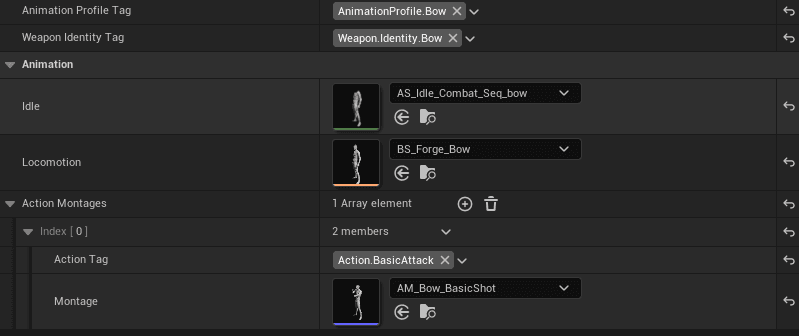
While the sword and shield were the baseline, the real test of the Weapon Identity framework was the introduction of the first ranged weapon: the Bow.
Swapping from a melee stance to a bow requires a total shift in how the character moves and holds themselves. Because of the new architecture, I was able to drop in a Data asset and have the character immediately adopt the correct draw stance and locomotion animations without touching the Animation Blueprint logic.
This also gave me the chance to harden the Projectile Replication layer. Ensuring that arrows feel snappy and accurate on a dedicated server—even with latency—required a rigorous pass on how we sync the launch and impact events. The result is a ranged combat loop that feels just as authoritative as the melee strikes.
Making Combat "Sticky" (Held Name Lock)
Something that became apparent almost immediately after I finished the animation stances was the need for proper "namelocking."
If you’ve played a classic top-down ARPG, you know the technique: clicking and holding your cursor on an enemy effectively "locks" your character onto that target. Without it, combat is a mess—your character stops mid-swing because your mouse slipped off a tiny skeleton, killing the flow instantly.
Implementing Held Name Lock solved this and made bow and ranged attacks feel so much more natural, especially while using WASD for movement. Now, you can move your cursor, look at the UI, or panic-click—as long as that button is held, your character is staying on that target. It makes the combat feel "sticky" and authoritative, especially when you’re diving into a pack of twenty enemies.
The UI "Aha!" Moment: The Globes & The Skill Picker
For an initial uplift, I tried integrating third-party UI elements for the skill bar and other areas. They did the job, but they never quite fit the "Forge" aesthetic or followed the direction I wanted.
This month, I decided to build it my way. I used GenAI to generate the base concepts for the statues and frames, then brought them into GIMP to manually tailor and paint them until they felt right. Seeing those deep red health globes and swirling blue mana pools finally framed by my own custom art changed the vibe of the entire screen. It felt great to establish my own direction for the UI layer instead of trying to makeshift a look from generic asset packs.
That visual polish was matched by a massive technical shift: the Skill Picker. I’ve finally moved away from hardcoding raw GAS abilities into specific input slots. I landed a dynamic binding system that decouples your skills from your keybinds. Now, when you click a slot on your action bar, a Diablo-style tray pops up allowing you to bind any unlocked skill or shared action on the fly. It gives you total control over your playstyle while keeping the under-the-hood implementation clean and flexible.
Heavy Hitting: Shield Charge & Motion Warping
Late in the month, I finished the Shield Charge. To make it feel impactful, I integrated Motion Warping. Instead of the character just sliding toward an enemy, the animation now dictates the travel and the slam. You feel the wind-up, the momentum, and the physical weight of the impact. It turned a "button press" into a satisfying combat moment.
I specifically built the charge using Montage Sections to split the ability into distinct "Charge-up," "Travel," and "Impact" phases. This gives the gameplay systems granular control—if a player is stunned mid-charge, the system knows exactly how to interrupt the movement and play the correct reaction. It’s a level of polish that makes the networked experience feel much more robust.
To support this variety of combat, I've tuned the animation system to handle both full-body and upper-body layering. This means light attacks can play on the upper body so you can keep your momentum while moving, while heavy abilities like the Shield Charge can take over the full body to sell the commitment and power of the strike. It’s that balance that finally makes the movement and combat feel cohesive.
What’s Next?
With the UI and combat feeling solid, I’m turning my eyes toward the horizon:
- Weapon-Driven Damage: Moving away from GAS abilities owning pure damage values and implementing a system where weapon stats directly influence the final output.
- Ability Expansion: Filling out the skill sets for different archetypes now that the underlying binding and animation systems are stable.
- Skill Tree UI: Giving the skill tree a major visual and functional update to match the new "Forge" aesthetic established with the globes and action bar.
April was a massive turning point. Forge doesn't just "work" anymore—it's actually starting to be fun to play.